Two year calendars 2014/2015 (UK)
for Microsoft Word
Free printable two year calendars (UK)
for years 2014 and 2015 in Word file format
Advertisement
The number of bank holidays, the substitute days, Easter, British Summer Time and the working days of 2014 and 2015 are compared in a table below the templates, together with the bank holiday dates of each year and ideas for planning ahead.
Two year calendars 2014/15 UK for Microsoft Word,
landscape orientation (2 templates)
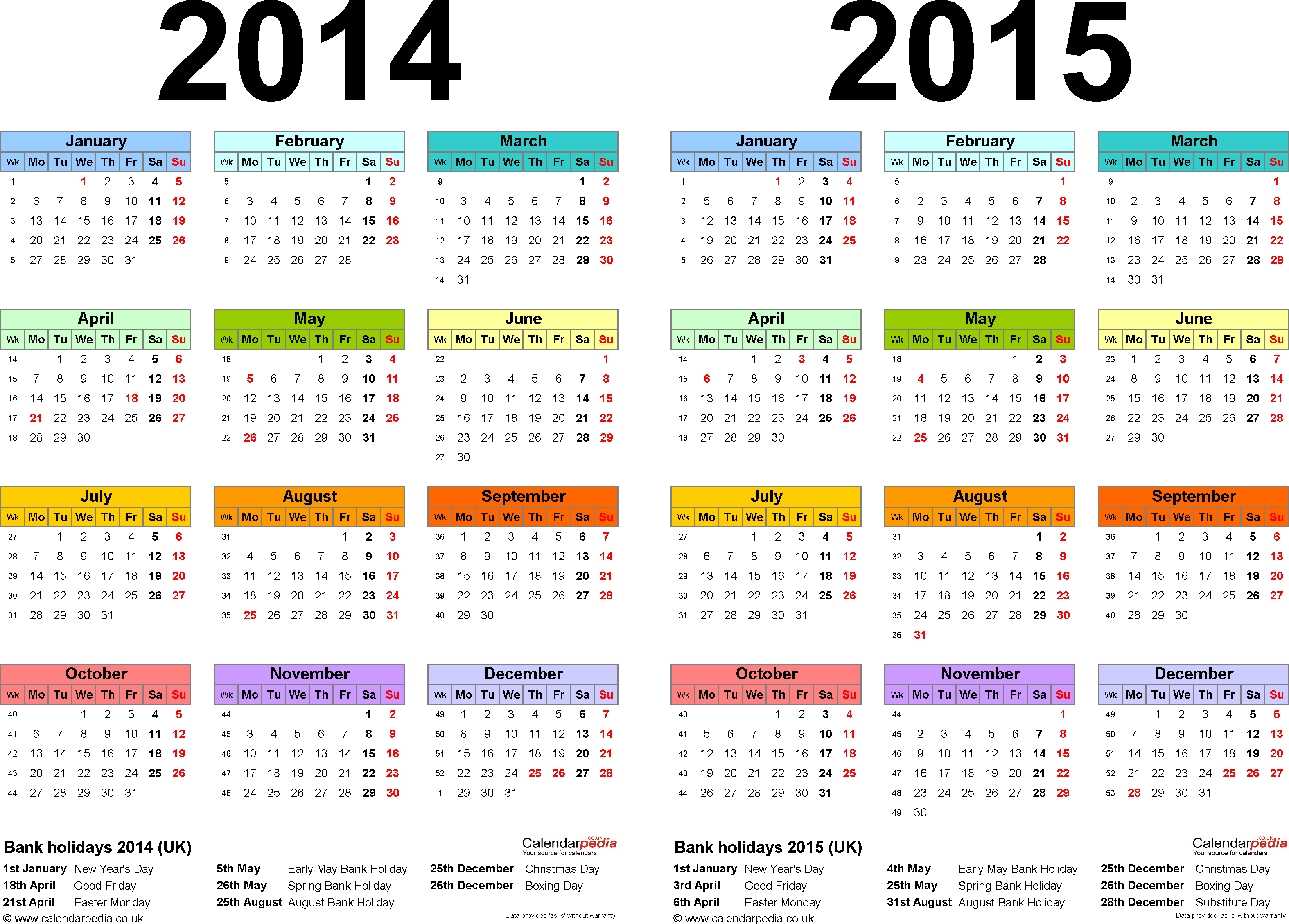
landscape, side by side, in colour
Template 1:
Two year calendar 2014/15 (UK)
landscape, side by side, in colour
- runs from 1 January 2014 to 31 December 2015
- two yearly calendars on one A4 page, arranged side by side
- landscape orientation (horizontal)
- in "rainbow" colour scheme that reflects the changing of the seasons
- each month shaded in a different colour that visually separates and distinguishes it for easy recognition and navigation
- makes it easy to scan the year while still reading each month independently
- UK edition with bank holidays highlighted in red
- fully editable and customisable
Download template 11 page · 50 KB · docx file

landscape, side by side
Template 2:
Two year calendar 2014/15 (UK)
landscape, side by side
- two year calendar from 1 January 2014 to 31 December 2015 on one A4 page, landscape orientation (horizontal)
- 2014 and 2015 side by side, each year in four rows of three months - easy to compare the same month in both years
- every month a small grid from Monday to Sunday, with a week number column on the left
- Saturdays shaded pale yellow, Sundays pale orange - Calendarpedia's classic standard design
- UK edition with the England and Wales bank holidays highlighted in red and listed with their dates in a table beneath each year, substitute days included
- clear and uncluttered - good for planning ahead into the next year at work or at home
- fully editable and customisable
Download template 21 page · 49 KB · docx file
Two year calendars 2014/15 UK for Microsoft Word,
portrait orientation (2 templates)

portrait, stacked, in colour
Template 3:
Two year calendar 2014/15 (UK)
portrait, stacked, in colour
- runs from 1 January 2014 to 31 December 2015
- two yearly calendars on one A4 page, arranged on top of each other
- portrait orientation (vertical)
- in "rainbow" colour scheme that reflects the changing of the seasons
- each month shaded in a different colour that visually separates and distinguishes it for easy recognition and navigation
- makes it easy to scan the year while still reading each month independently
- UK edition with bank holidays highlighted in red
- fully editable and customisable
Download template 31 page · 107 KB · docx file

portrait, stacked
Template 4:
Two year calendar 2014/15 (UK)
portrait, stacked
- two year calendar from 1 January 2014 to 31 December 2015 on one A4 page, portrait orientation (vertical)
- 2014 in the top half, 2015 in the bottom half, each year in three rows of four months - reads like two yearly calendars on one sheet
- every month a small grid from Monday to Sunday, with a week number column on the left
- Saturdays shaded pale yellow, Sundays pale orange - Calendarpedia's classic standard design
- UK edition with the England and Wales bank holidays highlighted in red and listed with their dates on the lines beneath each year, substitute days included
- clear and uncluttered - good for a wall, a fridge door or a folder
- fully editable and customisable
Download template 41 page · 109 KB · docx file
Key dates 2014 and 2015 at a glance
Key figures for each year
| 2014 | 2015 | |
|---|---|---|
| Bank holidays in England and Wales | 8 | 8 |
| Substitute days | none | Mon 28 Dec |
| Easter Sunday | 20 April | 5 April |
| British Summer Time | 30 Mar to 26 Oct | 29 Mar to 25 Oct |
| Working days in England and Wales | 253 | 253 |
| Weeks (ISO week numbers) | 52 | 53 |
| Days | 365 | 365 |
Good to know
The templates mark the bank holidays for England and Wales. A substitute day is the weekday on which a bank holiday is taken when its date falls at the weekend. Working days are Monday to Friday, not counting bank holidays. British Summer Time begins at 1am on the last Sunday in March and ends at 2am on the last Sunday in October. A year has 53 ISO weeks when it starts on a Thursday, or on a Wednesday in a leap year. Scotland and Northern Ireland have some different bank holidays - see bank holidays 2014 and bank holidays 2015.
Bank holidays 2014 and 2015 in England and Wales
2014
Wednesday 1 January: New Year's Day
Friday 18 April: Good Friday
Monday 21 April: Easter Monday
Monday 5 May: Early May Bank Holiday
Monday 26 May: Spring Bank Holiday
Monday 25 August: August Bank Holiday
Thursday 25 December: Christmas Day
Friday 26 December: Boxing Day
2015
Thursday 1 January: New Year's Day
Friday 3 April: Good Friday
Monday 6 April: Easter Monday
Monday 4 May: Early May Bank Holiday
Monday 25 May: Spring Bank Holiday
Monday 31 August: August Bank Holiday
Friday 25 December: Christmas Day
Monday 28 December: Boxing Day (substitute day)
From one year to the next
Easter Sunday falls on 5 April in 2015, 15 days earlier in the year than in 2014, so the Easter bank holidays move with it. 2014 starts on a Wednesday and has the same dates and days of the week as 2003 and 2025. 2015 starts on a Thursday and has the same dates and days of the week as 2009 and 2026. Only the weekdays repeat, though: Easter and the bank holidays that depend on it fall on different dates.
Planning across two years
Plans that run past 31 December
A two year calendar shows 24 months on one page, so plans that run on into the next year stay in one view: a building project or a house move, a wedding planned a year or more ahead, a fixed-term contract or a tenancy, a pregnancy and the baby's first months, or a training plan for a marathon.
Comparing the years
With the years side by side or one above the other, it is easy to see how the same month looks in each year: on which weekday a birthday or an anniversary falls, when the Easter holidays come round, or how many working days a month has. That makes the calendar useful for setting dates for repeat events, such as an annual conference, a club tournament or a family get-together.
Deadlines and renewals
Mark the dates that come up once a year or less: MOT and insurance renewals, the end of a phone contract, passport and driving licence expiry, Self Assessment deadlines (31 January for online returns), or the end of a warranty. On a two year calendar you see them early enough to act in good time.
Ideas for your two-year calendar 2014 and 2015 in Word
Business plans, bids and project proposals
Copy the two-year calendar into a funding bid, a tender, a project proposal or a strategy document to show the timeline, with the milestones typed into the days. Change the fonts to match the rest of the document and add your organisation's logo alongside the Calendarpedia logo.
Text boxes and a PDF copy
Insert a text box beside the calendar for a key to the phases or a short summary of the plan, and set its layout option to "In front of text", so the calendar keeps its layout. File → Save As → PDF then gives you a copy to email or attach to the bid that looks the same on every screen.
Using the templates
Terms of Use
All templates on this site may be used free of charge, at home, at work and at school, provided that the Calendarpedia logo, the copyright notice with the website address ("© Calendarpedia® www.calendarpedia.co.uk") and the disclaimer ("Data provided 'as is' without warranty") stay on the template. The templates may not be sold or built into products that are sold, and the blank templates (or copies with only minor changes) may not be offered for download on other websites. All content on this site is protected by copyright © 2011-2026 Calendarpedia®. All rights reserved. Data is provided 'as is' without warranty of any kind, may contain errors and is subject to change without notice. If you find a mistake, please let us know. Full details are in our Terms of Use.
System requirements and compatibility
Every template is saved in Microsoft Word (.docx) format, the Office Open XML document format standardised as ISO/IEC 29500, which Word has used since Word 2007.
- Microsoft Word
The templates open in Word 2007 and later for Windows, Word 2008 and later for Mac, Microsoft 365 and Word for the web. - Google Docs
The .docx files open in Google Docs with the layout intact, so you can fill the template in from a browser on any computer, tablet or phone without installing anything. - Free alternatives
If you don't have Microsoft Word installed, use Word for the web (Microsoft 365 for the web, formerly Office Online, free with a Microsoft account) or one of the free alternatives to Microsoft Office: LibreOffice Writer or FreeOffice TextMaker (and others). Apple's Pages opens the files too, but the layout may shift, and OpenOffice Writer unfortunately can't open our Word calendars correctly. - Editing on a phone or tablet
The Word app for iPhone, iPad and Android and the Google Docs app both open these files, so you can add or check an entry on the move and print the template later from any computer. - Your own dates, colours and logo
Type your entries straight into the day cells, shade the days that matter to you and add your own logo alongside the Calendarpedia logo - our FAQ shows how to add your own dates, colours or logo. - Printing in black and white
To save colour ink, you can print any template in black and white. - Older versions of Word
Word 2003 and older versions can't open .docx files directly. Open the template in Word for the web or one of the free programs above instead, or use the PDF version of the calendar.
How to open and print these templates in Google Docs
Download the .docx file first. Then either drag it into Google Drive, right-click it and choose Open with → Google Docs, or open Docs and go to File → Open → Upload. The template keeps its layout, and you can type into the days exactly as you would in Word.
To print from Docs, go to File → Print and check that the page orientation matches the template you chose - File → Page setup changes it if it doesn't. Because the file sits in Drive, you can share it with a team or a family and everyone works on the same template.
Problems downloading, opening or printing a template?
Our FAQ explains how to print a template in a different size or in black and white, what to do if the edges are cut off, a download doesn't work or a file won't open in Excel or Word, which other programs you can use and how to add your own dates, colours or logo.